Address poisoning scam: the fake USDT address trap
Short answer: address poisoning is when a scammer sends you a tiny transfer from an address that looks almost the same as one you use, so it shows up in your history. If you later copy that look-alike address, your USDT goes to the scammer. Never copy addresses from your transaction history, compare the whole address character by character, and use saved contacts.
A quiet scam is stealing USDT from careful people every day. It does not steal your password or your wallet. It simply tricks you into copying the wrong address from your own history. Here is how it works, and how to stay safe.
You can check an address's history for look-alike transfers in the TronTransfer explorer: poisoning attempts are flagged.
If you send USDT (Tether) on the TRON network, this page is for you. The scam is called address poisoning, and it is designed to fool busy people who send money often, such as money exchangers and remittance shops. Read it slowly. It could save you a large payment.
What is address poisoning?
Every TRON wallet has a long address, a string of about 34 letters and numbers that starts with the letter T. It is too long to remember, so almost everyone copies and pastes it. Scammers know this.
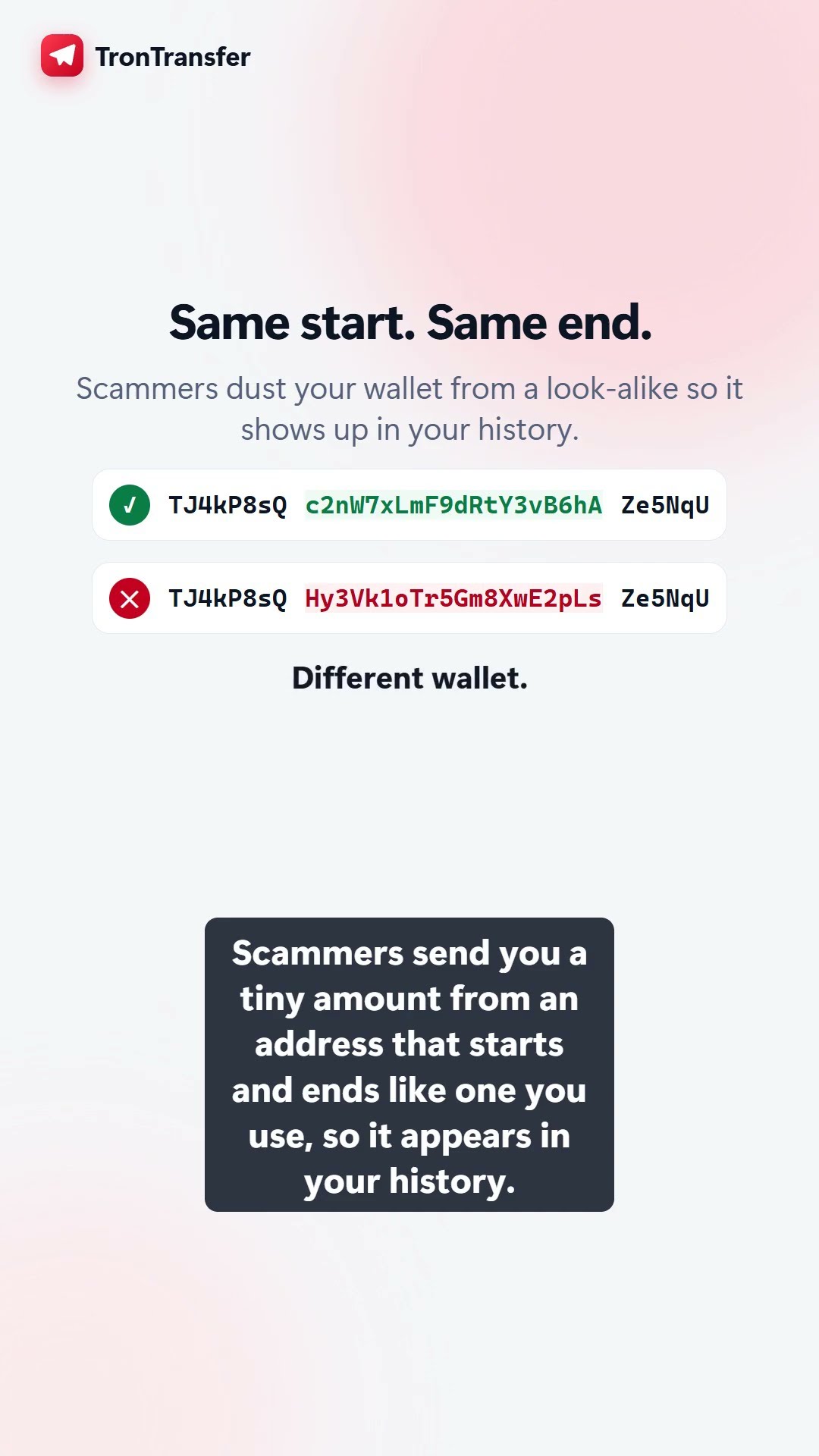
In an address poisoning attack, the scammer creates a fake wallet whose address looks almost the same as one you use often, maybe a customer you pay every week. Then they send a tiny amount, sometimes a fraction of a cent, from that fake wallet into your history. This tiny transfer is called a dust attack, because the amount is like a speck of dust. Its only job is to plant the fake address in your list of recent transactions.
Later, when you go to pay that customer, you scroll your history, see an address that looks right, copy it, and send. But you copied the scammer’s fake address. The USDT is gone. This is why it is also known as the similar address scam or the copy paste address scam.
Why checking a few characters is not enough
Many people check an address by looking at the first four characters and the last four. That feels safe. It is not.
Scammers use special software that grinds through millions of addresses until it finds one that begins and ends with the same characters as the real one. Only the middle is different. So a quick glance at the start and end shows a perfect match, while the money still goes to the thief.
See how easy it is to miss
| Address in your history | Match? |
|---|---|
| TKxyz...long middle...9pQr (the real one) | Real |
| TKxyz...other middle...9pQr (the fake) | Fake |
Same first four. Same last four. Different wallet. If you only checked the ends, you would send to the fake one.
How to stay safe
The good news is that this scam is easy to beat once you know the habits. Follow these simple rules every time.
- Check the full address, not just the ends. Compare it character by character against the address the person gave you directly, not the one sitting in your history.
- Use a saved contact. Save each person you pay as a named contact in your wallet, then always pay from that saved contact. Never copy from the recent transaction list.
- Ignore tiny transfers you did not expect. A random dust payment for almost nothing is usually bait. Do not reuse the address it came from.
- Let a tool check the address for you. This is the safest habit of all, and it is free on TronTransfer.
How TronTransfer flags poisoned addresses for you
When you send USDT through TronTransfer, we automatically check the recipient before you confirm, at no charge. That check looks for known scams, blacklisted or frozen wallets, and address poisoning, meaning fake look-alike wallets that were planted in your history. If the address looks suspicious, you get a plain warning in clear language, so you can stop before the money leaves your wallet.
Your USDT never leaves your own wallet until you approve. TronTransfer is non-custodial, which simply means we never hold or touch your money. We only help you send it more cheaply and check that the address is safe first. It works with TronLink, Trust Wallet, and imToken.
If you want to check a wallet before you deal with someone at all, you can also use our separate AML Check tool. It screens any TRON address for sanctions, mixers, scams, and darknet links, and gives you a clear risk score and verdict. And because we sponsor the network fee, a transfer that normally burns about $2.26 to $4.44 in TRX usually costs just ~$1.81 here, ~20% cheaper. The exact fee always shows in TRX and USD before you confirm.
What to do if you already sent to a poisoned address
First, take a breath. Then understand one hard fact: TRON transfers cannot be reversed. Once a transfer is confirmed on the network, no one, not the wallet, not TronTransfer, not TRON itself, can pull it back. Anyone who promises to recover it for a fee is almost certainly a second scam.
Even so, it is worth doing these steps:
- Save the details. Note the fake address, the amount, and the transaction, so you have a record.
- Report it. Tell your wallet provider and, if the thief moves the funds to an exchange, report the address there. It may help flag or freeze the wallet for others.
- Clean up your habits. Delete the poisoned address, save your real contacts, and from now on send through a tool that checks every address for you.
Losing money once is painful. The lesson is cheap compared to the loss: verify the full address, every single time, and let software watch your back.
Watch the video
Frequently asked questions
What is an address poisoning scam?
It is a trick where a scammer sends you a tiny transaction from a wallet whose address looks almost identical to one you normally use. That fake address then sits in your transaction history. Later, if you copy it by mistake and send USDT, the money goes to the thief instead of the person you meant to pay.
Why is checking only the first and last few characters not safe?
Scammers use special software to create a fake address that starts and ends with the same characters as a real one. If you only glance at the beginning and end, the two look the same. The middle is different, so you must compare the whole address, character by character, or use a saved contact.
How does TronTransfer protect me from a poisoned address?
Before you confirm any send, TronTransfer automatically and freely checks the recipient for scams, blacklisted or frozen wallets, and address poisoning, meaning fake look-alike wallets planted in your history. If something looks wrong you get a clear warning before the USDT leaves your wallet.
Can I get my money back if I already sent to a poisoned address?
No. TRON transfers are final and cannot be reversed or cancelled once confirmed. You can report the scam address to your wallet provider and the exchange the thief may use, but nobody can force a refund. The best protection is to check the full address before every send.
Send USDT cheaply and safely now