Early access — in development and security review; not yet on the Chrome Web Store
Send USDT for less.
Safely.
TronTransfer Wallet is a Chrome extension for TRON that checks every address before you send, and picks the cheaper way to pay the network fee: about 5.48 TRX per USDT send instead of burning ~6.5 TRX.
- Keys stay on your device
- Every address checked
- Fees shown upfront, paid in TRX
Cheaper USDT sends
Pay a flat fee instead of burning TRX for energy
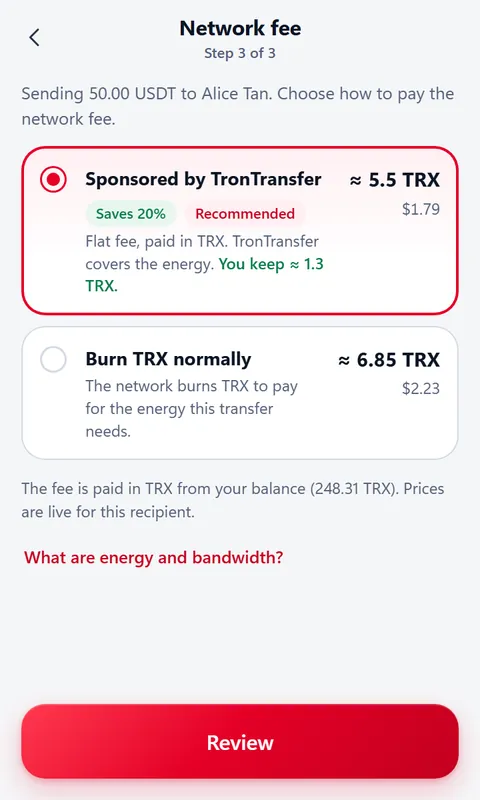
Every USDT transfer on TRON needs about 65,000 energy (about 131,000 if the recipient has never held USDT). Without staked TRX, the network burns your TRX to pay for it. The wallet can send through TronTransfer instead: we sponsor the energy, and you pay one flat fee, in TRX, from your own wallet.
Cheaper by default, never forced. The sponsored option is preselected only when it costs less, and shows the saving (about 20% less today).
Burn TRX normally is always one tap away, and use my energy appears at 0 TRX when you have staked enough.
You still need TRX for the fee. Prices are live for each recipient, and the wallet tells you before signing if you’re short.
Live prices as of October 28, 2026 (TRX = $0.3307). See today’s USDT fee for how they’re calculated.
New-address protection
Built against the scams TRON users actually hit
Most USDT losses on TRON aren’t hacks. They’re look-alike addresses copied from history, a signature that hands over the account, or a “cheap energy” site with an unlimited approval. The wallet checks for each one before you sign.
Look-alike address detection
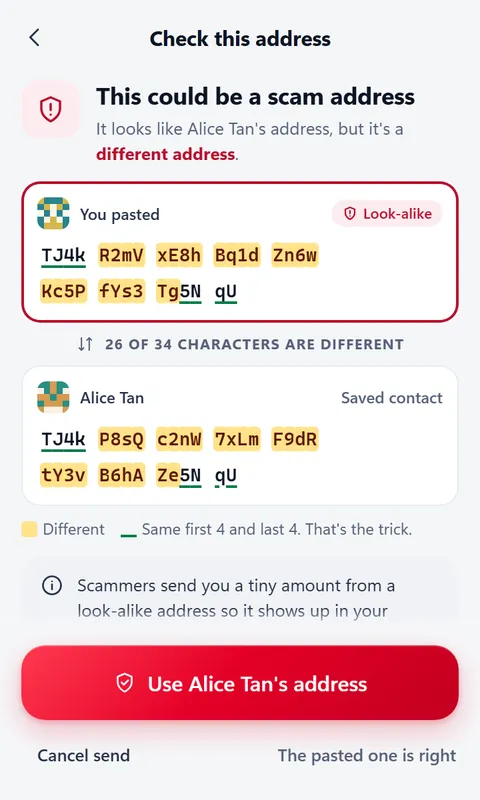
Scammers send you a tiny transfer from an address that matches the first and last characters of one you use, hoping you copy it later. Every recipient is compared with your history and contacts. A near-match is stopped with the differences highlighted, and you’re offered the address you meant.
- First-time recipients are flagged: “You’ve never sent to this address”
- Big amounts to a new address suggest a small test send first
- Tether-blacklisted addresses, token contracts and 0x (Ethereum/BNB-style) addresses are caught before any fee is spent
Permission-takeover guard
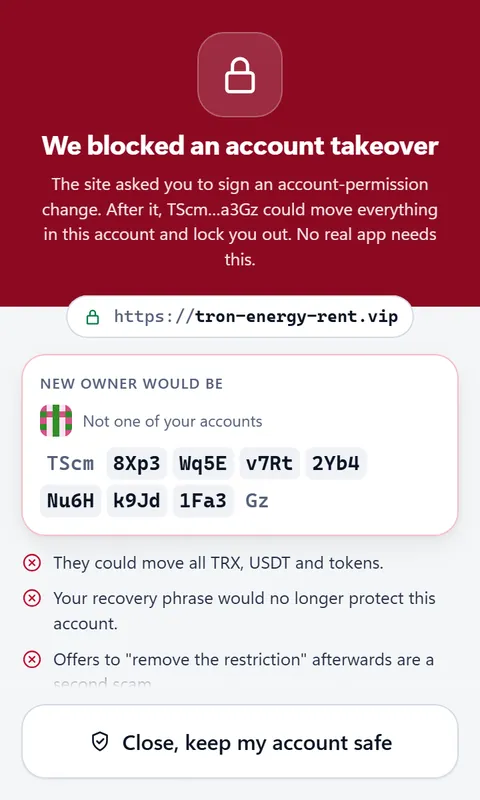
A TRON account can hand “owner” control to another address. Drainers trick people into signing that change, then empty the account and lock them out. Websites can never ask the wallet for a permission change, and inside the wallet it takes a full-screen warning and typing “GIVE CONTROL”.
- Imported a “found” seed phrase? The wallet checks who really controls the account and warns you before you send TRX into a trap
- Your own accounts’ permissions are re-checked in the background
Spam & fake-token filter
Zero-value and dust transfers, look-alike senders and fake “USDT” tokens are hidden from Activity and labelled “Possible scam”, with no copy button. Token names are never shown as links.
Approvals manager
See which apps can spend your tokens, with unlimited approvals highlighted. Revoke in one tap; it’s a normal transaction you review first, with a small TRX fee.
Pre-flight checks
Before you sign, the wallet simulates the transfer. If it would run out of energy and still burn fees, it stops and tells you exactly how much more TRX you need.
No blind signing
Every transaction from a website is decoded into plain words before you approve: who gets what, which contract, and any unlimited approval in red with an editable amount.
Frozen-funds warnings
If your own USDT is frozen by Tether, the wallet explains it before you pay any fee. Incoming USDT from blacklisted or high-risk addresses is flagged in Activity.
Safety Center
Plain rules, one tap from every warning: nobody needs your phrase, “recovery services” and “remove the restriction” offers are scams, and how to reach real support.
How a send works
Four steps, nothing hidden
The confirm button stays off until the wallet has said, in plain words, who gets what, the total cost in TRX and USD, and every risk it found.
- 1
Pick the recipient
Paste an address or choose a contact. It’s checked as soon as it’s valid.
- 2
Enter the amount
Choose the token. “Max” leaves enough TRX for the fee.
- 3
Choose the fee
Sponsored or burn TRX normally, with live prices for this recipient.
- 4
Review and hold to send
The full address with the middle highlighted, the fee and the total. Then hold the button.
Security model
Your keys never leave your device
TronTransfer Wallet is non-custodial. We can’t see your phrase, can’t sign for you, and can’t move your funds.
Stays on your device
- Encrypted vault. Your recovery phrase and keys are encrypted with your password (scrypt + AES-256-GCM) and only unlocked inside the extension.
- Transactions built locally. The wallet builds each transaction itself, then decodes the exact bytes and compares them with what you approved before signing. Any mismatch is refused.
- Auto-lock. Locks after 15 minutes idle (you can change it) and whenever the browser restarts.
What the extension won’t do
- No remote code. Everything that runs ships inside the extension, under a strict content security policy.
- No analytics or tracking. It talks only to TronGrid (to read the chain) and TronTransfer (prices, address checks, sponsored sends).
- No secrets to websites. Sites only see the address you choose to connect, and can’t approve their own requests.
- Never asks for your phrase on a website. Anyone who does is not us.
Where it stands: the wallet follows a written security model and is being tested end to end on a private TRON test network. It has not been externally audited yet. An independent audit is on the release checklist and must happen before a public release, which is why there’s no download today.
Screenshots
A look at the current build
Real screens from the extension, shown with demo data. Details may change before release.
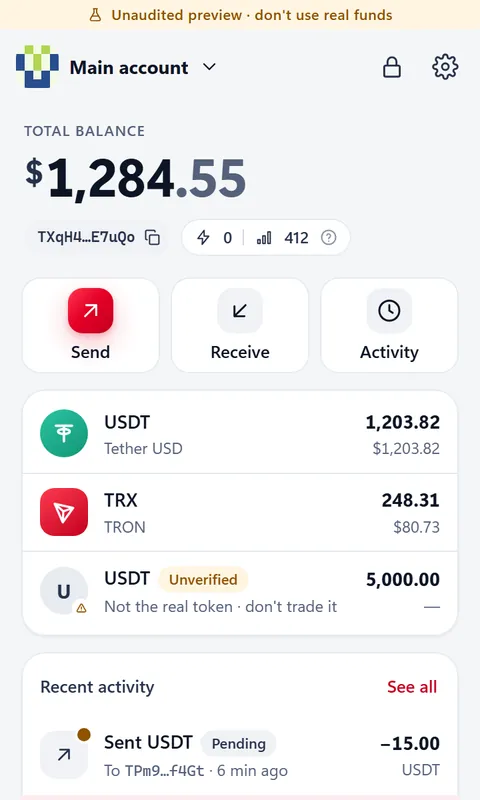
HomeBalances, energy and bandwidth, and fake tokens marked “not the real token”. Fee choiceSponsored or burn TRX normally, with live prices for this recipient. Look-alike checkSame first 4 and last 4 characters: that’s the trick it catches. Takeover blockedA site asked to change who controls the account. The wallet said no. 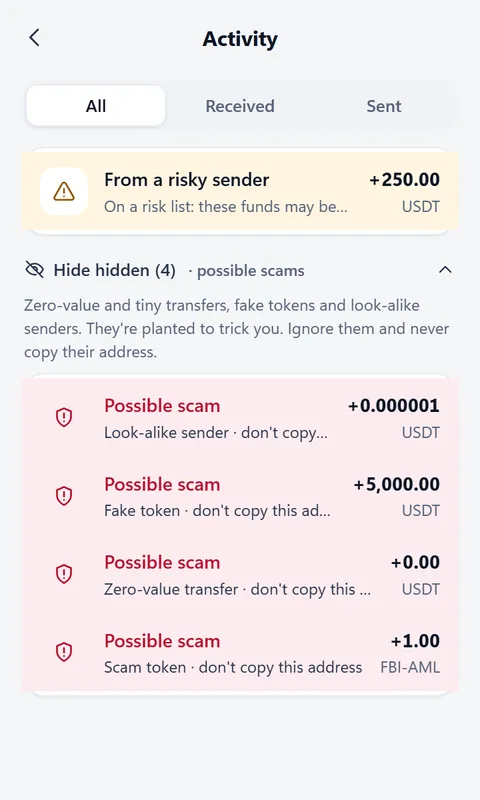
Spam filterDust, zero-value and look-alike transfers are hidden and labelled. 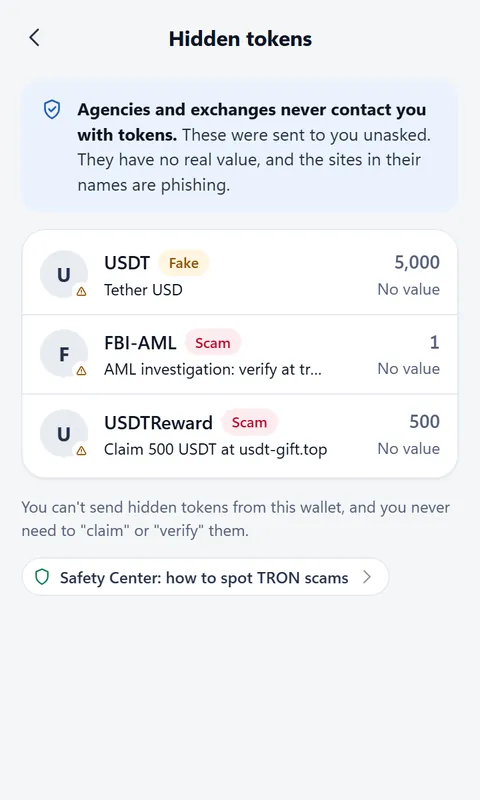
Fake tokens“Claim” and fake-agency tokens are hidden, with no links. 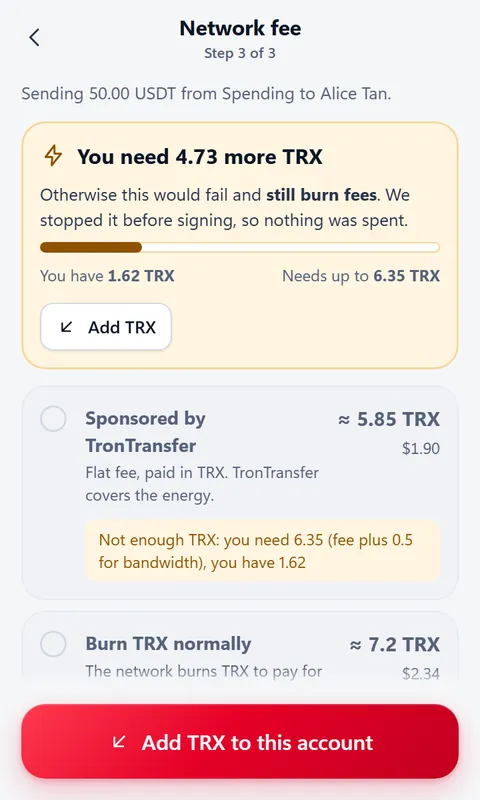
Pre-flight checkStopped before signing, so nothing was spent. 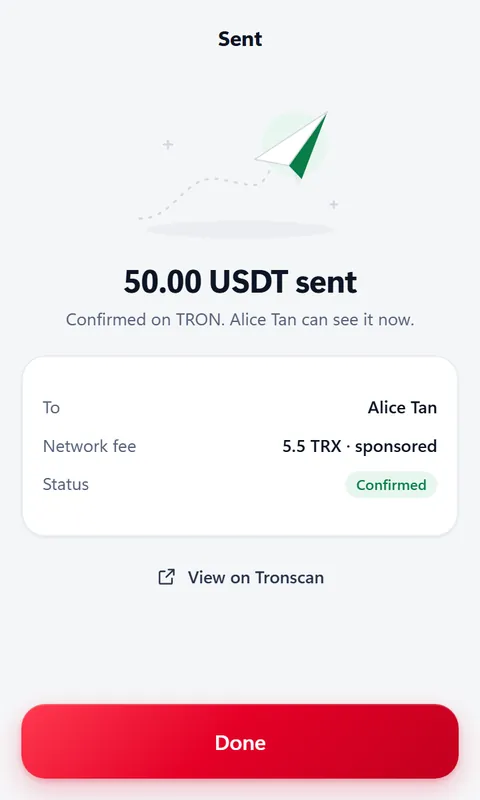
SentConfirmed on-chain, with the fee shown and a Tronscan link.
Beware of fake wallet extensions
Fake TRON wallet extensions have appeared in the Chrome Web Store before. TronTransfer Wallet isn’t listed anywhere yet. When it launches, the only install link will be on this page, trontransfer.com/wallet, and we’ll announce it on our own X and YouTube accounts. Until then, any “TronTransfer Wallet” you find is not ours.
Want to know when it’s ready?
We’ll announce the launch on X and YouTube. No sign-up needed. In the meantime, you can already send USDT for less with the TronTransfer web app and the wallet you use today.
Frequently asked questions
Can I download TronTransfer Wallet now?
Not yet. It’s in development and security review, and it isn’t on the Chrome Web Store. When it launches, the install link will be published here and announced on X and YouTube. Any extension that claims to be TronTransfer Wallet before then is not ours.
How much does it cost?
The extension will cost nothing to install. Sending on TRON always has a network fee, paid in TRX. A sponsored USDT send costs about 5.48 TRX (~$1.81) to a wallet that already holds USDT, or about 10.76 TRX to a brand-new one, instead of burning about 6.5 TRX or 13.1 TRX for energy.
Do I still need TRX?
Yes. The fee is paid in TRX from your own wallet, so keep about 5.48 TRX plus a small buffer for bandwidth. If you’re short, the wallet tells you exactly how much more you need before you sign, instead of letting a send fail and still burn fees.
Can TronTransfer access my keys or move my funds?
No. Your phrase and keys are encrypted on your device and never sent anywhere. Every transaction is built and signed inside the extension after you approve it. A sponsored send is the same two signed transactions as the TronTransfer web app: the fee you approved and your USDT transfer to the recipient you chose.
Do I have to use sponsored sends?
No. Sponsored sends are preselected only when they’re cheaper. You can always burn TRX normally, or use your own staked energy at 0 TRX when you have enough.
Can I import the wallet I already have?
Yes: a 12- or 24-word recovery phrase, or a private key. After importing, the wallet checks whether anyone else has control of the account, which catches the “free USDT seed phrase” trap.
Does it work with TRON websites and dApps?
It includes a TronLink-compatible connection for TRON sites. Each site has to ask before connecting, you see its real web address, every request is decoded before you sign, and account-permission changes are refused.
Has it been audited?
Not yet. It follows a written security model and is being tested on a private TRON test network. An independent external audit is on the release checklist and must happen before a public release.
Is there a mobile version?
The first release is a Chrome extension for desktop. On your phone, you can use the TronTransfer web app with TronLink, Trust Wallet or imToken.